Show Your Work: Testing Three AI Editing Tools
Over the past few months, I have reviewed two AI tools for editors that provide tracked changes in Microsoft Word: Claude for Word and MarkMyWords.
I was curious how these AI tools would compare in the wild, so to speak, with my own writing from several years ago and with grammar, spelling, punctuation, and factual errors that I planted based on issues I’ve encountered in my own editing work.
This blog post shares my experiment and its results.
The Three Tools I Tested
In addition to Claude for Word and MarkMyWords, I tested editGPT. I chose these three tools because:
I have used all of them (and am very comfortable with how they work).
They provide their suggestions as tracked changes in Word that you can accept or reject individually.
They offer preset editing prompts, which are especially helpful for new users of AI tools (i.e., you don’t have to worry about writing your own prompts).
They offer the option to add your own custom prompts or instructions.
The following chart lists the tools I tested and the preset prompts and models I used. I’ve included the model information because the models change frequently.
| Tool | How it works | Preset copyediting prompt I used | Model |
|---|---|---|---|
| Claude for Word | Works directly in Microsoft Word. | /copy-edit, which checks for spelling, grammar, punctuation, capitalization, article usage, and doubled or missing words (Claude for Word calls these prompts skills) | Claude Opus 5 (you need a subscription to Claude to use Claude for Word) |
| editGPT | Lets users upload a Word file to Docx Express and download the document with tracked changes. | Natural, which corrects errors and lightly rephrases awkward passages while aiming to retain the writer’s voice | OpenAI’s ChatGPT models (editGPT doesn’t specify; i.e., I wasn’t able to choose a model) |
| MarkMyWords | Works directly in Microsoft Word. | Light Editing, which checks include spelling, grammar, punctuation, and capitalization errors; obvious typos and repeated words; commonly misused words; and number formatting inconsistencies | Claude Opus 5 (you do not need a subscription to Claude to use MarkMyWords) |
Note that Claude for Word and MarkMyWords run on the same underlying large language model (Anthropic’s Claude). In contrast, editGPT runs on an entirely different large language model (OpenAI’s ChatGPT), which means that when all three tools miss the same error, two independent large language models (LLMs) made the same mistake.
How I Set Up My Experiment
I chose two pieces of my own writing that were about 400 and 600 words, respectively. I wrote the shorter piece (a press release) in 2018 and the longer one (an article about figuring out project costs) in 2021.
I then used an Excel worksheet to document every error before I planted 25 errors in the two pieces of writing. The 25 errors are in 12 categories: punctuation, hyphenation, spelling/typo, serial comma, factual error, subject-verb agreement, dangling modifier, number treatment, comma splice/run-on, faulty parallelism, homophone, and usage.
Here’s a screenshot of what my Excel worksheet looked like for the errors in my shorter piece of writing:
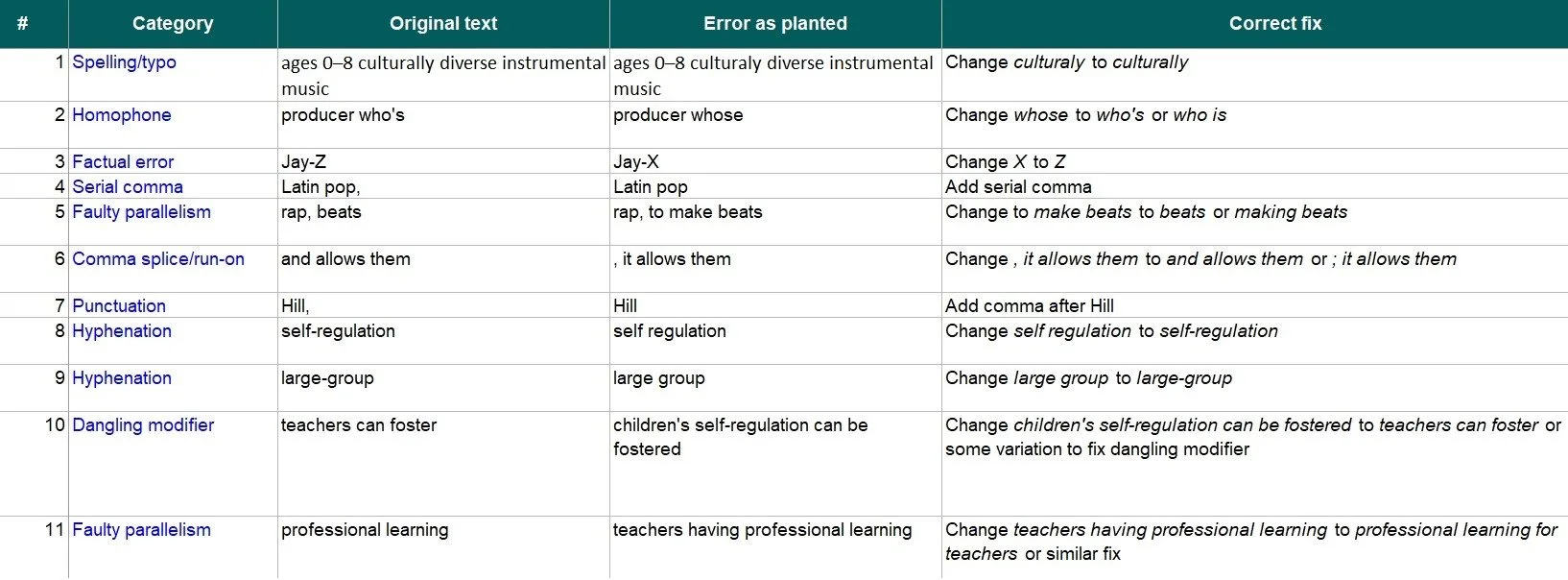
Error Categories and Errors for Shorter Piece of Writing
The easy categories—spelling, punctuation, and subject-verb agreement—got one or two errors each in the two pieces of writing. The harder categories got more: three dangling modifiers, three faulty parallelisms, and four hyphenation errors across the two pieces of writing. Two errors were factual: I changed Jay-Z to Jay-X and 33 hours to 30 hours in a paragraph where the surrounding math makes 33 the only possible answer.
The following screenshots show the errors underlined in red. I should note that the shorter piece, written in 2018, includes a positive reference to P. Diddy that would not appear in a similar press release written today.
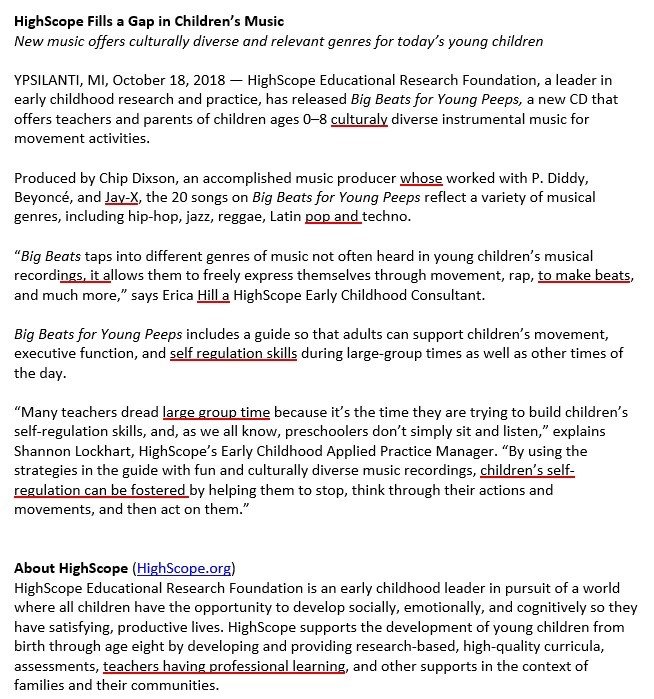
Planted Errors in Shorter Piece of Writing
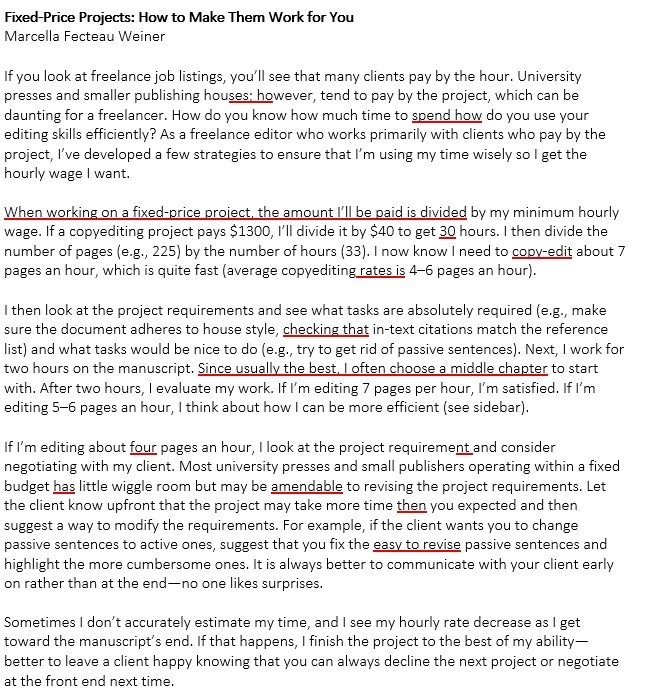
Planted Errors in Longer Piece of Writing
How I Ran My Experiment
I then ran each tool on the text containing the planted errors. For both pieces of writing, I ran every tool twice because these tools generate a fresh response each time. I wanted to see whether the two results were the same. Each error got one of four outcomes per tool:
| Outcome | Definition |
|---|---|
| Caught | Found the error and fixed it correctly. |
| Missed | Left it in place. |
| Wrong fix | Flagged it, but the correction was incorrect or changed the meaning. |
| New error | Introduced a problem that was not there before. |
The Results
Here are the counts from the first run of each tool. The last row shows how often the second run returned the identical result on the same text.
| 25 planted errors | Claude for Word | editGPT | MarkMyWords |
|---|---|---|---|
| Caught | 21* | 15 | 19 |
| Missed | 4 | 10 | 5 |
| Wrong fix | 0 | 0 | 1** |
| New error | 0 | 0 | 0 |
| Unrequested changes | 0 | 0 | 0 |
| Same result on both runs | 25 of 25 | 23 of 25 | 24 of 25 |
*Six of Claude for Word’s 21 catches were flags in its chat pane, not tracked changes—see below.
**An incomplete repair to a run-on sentence was the one wrong fix for MarkMyWords—see below.
The good news: Every AI tool caught every spelling, usage, homophone, and serial comma error on every run. And, even more surprisingly, none of the AI tools changed text that was already correct—not one edit landed on text where I hadn’t planted an error. I want to add a caveat here: I used each tool’s more conservative editing preset: /copy-edit for Claude for Word, Natural for editGPT, and Light Editing for MarkMyWords. All of these preset prompts explicitly leave style and tone alone. For editors whose biggest fear is an AI tool rewriting an author’s voice, no unrequested change is a reassuring result.
The bad news: No tool produced a correct fix for any of the three dangling modifiers. My favorite planted dangling modifier—When working on a fixed-price project, the amount I’ll be paid is divided by my minimum hourly wage—sailed past all three tools on both runs. The tools also weren’t consistent in fixing faulty parallelism.
The two factual errors split in an interesting way. Claude for Word identified both—Jay-X in the shorter piece and the arithmetic error in the longer one—but it flagged them in its chat pane instead of correcting them in the text, telling me they fell outside the scope of the copyediting prompt. editGPT missed Jay-X and the math error on both runs. MarkMyWords corrected Jay-X but missed the math error.
Claude for Word missed two of the dangling modifiers as well as two consistency errors (four pages should have been 4 pages; copy-edit should have been changed to copyedit). And six of Claude for Word’s catches were flags, not fixes. In every case, Claude named the problem precisely in the chat pane and told me the correction was outside the scope of the /copy-edit prompt, so I counted them as caught. In the shorter piece, Claude flagged the faulty parallelism and the Jay-X error. In the longer piece, it flagged the math error, one of the dangling modifiers, and the faulty parallelism. This is worth knowing if you use Claude for Word: Some of its sharpest observations never appear as tracked changes. If you work only from the markup and skip the chat pane (as shown in the screenshot below), you will not see the flagged errors.
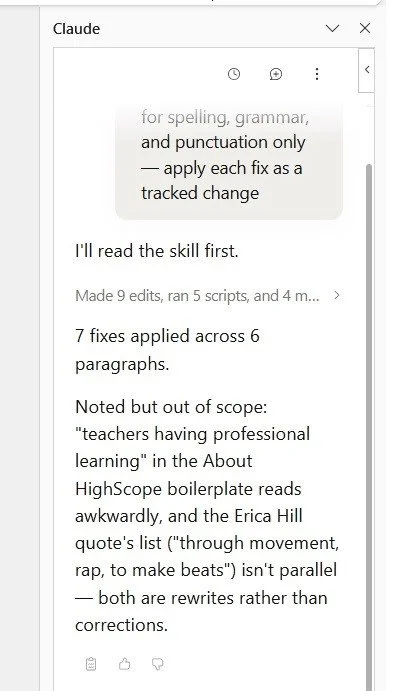
Claude’s Chat Pane Noting Errors Out of Scope for Shorter Piece of Writing
MarkMyWords had one wrong fix that involved a run-on sentence in the longer piece: It added the question mark but did not capitalize the first letter of the question that followed. It also missed the math error and the dangling modifiers.
One feature worth calling out: MarkMyWords can explain its changes in comments (see the screenshot below), so beyond editing your text, it can double as a quick teaching tool. Note that the comments are attributed to me, because that’s how I set it up.
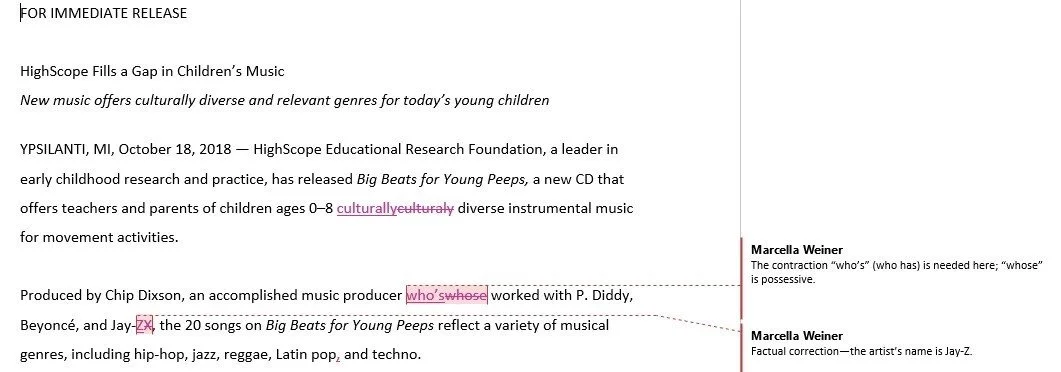
Corrections and Comments in MarkMyWords
editGPT had the lightest hand of the three and let the most errors through. It missed Jay-X on both runs, missed one hyphenation error in the shorter piece on both runs, and missed a number treatment error in the longer piece (four pages should have been 4 pages to match the earlier usage). It also missed every dangling modifier and the faulty parallelism in the longer piece of writing.
Claude for Word returned identical results on all 25 errors, both pieces, both runs. editGPT changed its answer on two errors between runs: It missed a faulty parallelism in the shorter piece the first time and caught it the second, and it missed a hyphenation error in the longer piece the first time and caught it the second. MarkMyWords changed on one error—the same faulty parallelism in the shorter piece was missed on the first run but caught on the second. If you are running one of these tools on a real manuscript, that is an argument for a second pass.
But What If I Wrote My Own Prompt?
As I noted earlier in this blog post, I used the preset prompts provided by each tool. However, I know how to write prompts, and each of the AI tools I tested lets you create and run your own prompt. So I tried the experiment again with a prompt I wrote. Note that I knew in advance what types of errors I had planted (e.g., faulty parallelism, factual errors, dangling modifiers), which isn’t how real-life editing works, so this prompt would give the AI tools an unfair advantage. That said, I wanted to see whether my own prompt would produce more accurate results.
Here is the prompt I wrote:
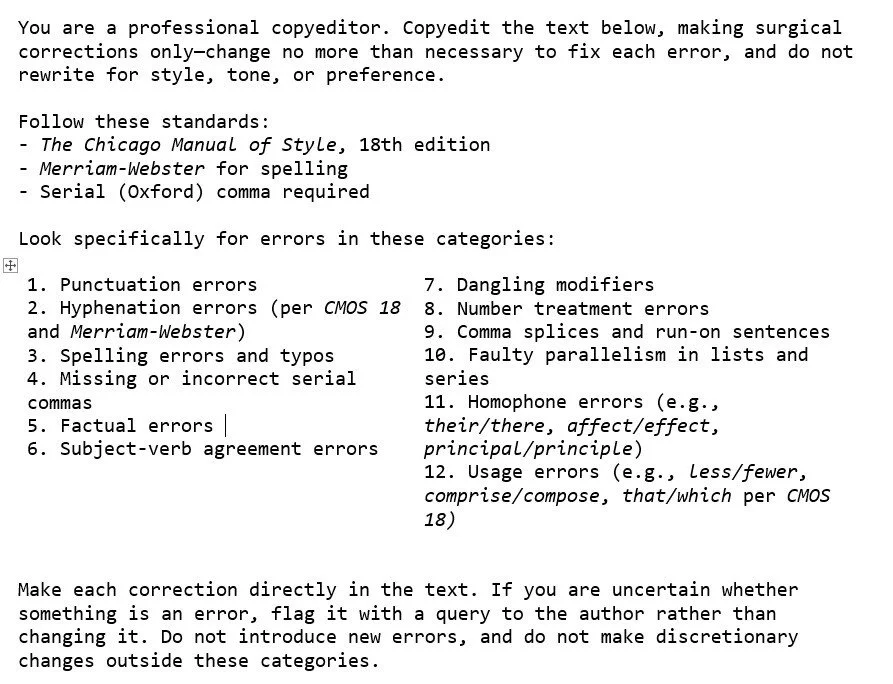
My Custom Prompt
The Results from My Own Prompt
With my own prompt, results improved across the board, but the same patterns held.
Claude for Word caught every error in both samples. It fixed one of the dangling modifiers outright—an improvement over its preset run—but it still only flagged the math error, the second dangling modifier, the Jay-X error, and the faulty parallelism in its chat pane rather than as tracked changes.
editGPT still struggled with dangling modifiers, missing every one across both samples, but it improved elsewhere. On the second run of the shorter piece, it caught the Jay-X error and the faulty parallelism. And on the second run of the longer piece, it caught more errors overall, including the faulty parallelism.
MarkMyWords came closest to catching everything. In the shorter piece, it caught every error and, for the first time, fixed both the faulty parallelism and the dangling modifier outright. In the longer piece, it caught nearly everything but repeated its one earlier miss: the missing capitalization after the run-on’s question mark. Like Claude for Word, it flagged one of the harder dangling modifiers in a comment rather than fixing it.
A Few Caveats About My Experiment
Before I get to what I learned, a few caveats:
Twenty-five errors across two pieces is a small sample.
Each tool’s preset (which is proprietary information) reflects that tool’s idea of a basic copyedit, so I wasn’t necessarily comparing Gala apples with Gala apples; it was more like comparing two different types of apples.
My planted errors are tidier than real ones, which usually arrive tangled together in the same sentence.
What I Learned From This Experiment
Two of the three tools I tested—Claude for Word and MarkMyWords—run on the same underlying model, Anthropic’s Claude, while editGPT runs on a different one entirely. All three shared a strength and a blind spot.
The strength: None of them touched my voice. With the preset prompts, each tool stayed inside the lines I gave it and made only the changes I asked for. With my own custom prompt, the tools stuck to those instructions too, and the results were even better.
The blind spot: None of the tools fully grasped nuance or context. The dangling modifiers gave every tool trouble, whether it ran on the preset prompt or my custom prompt. Also, any editor reading the press release about Big Beats today would immediately query or remove P. Diddy’s name. AI tools don’t understand that kind of context.
This, to me, is the real lesson. These tools are exactly that: tools. They can speed up the mechanical parts of a copyedit or be a good last check, but they do not replace an editor’s judgment and you still need to review every suggestion they make. One last note: These tools change constantly. If I ran this same test two months from now, I might get different (and maybe even better) results.
How I Used AI to Help Me with This Blog Post
I used Claude for this blog post for:
Figuring out the best way to go about the experiment. I knew what I wanted to test, but I wasn’t sure about the best way to go about making that test. I gave Claude my idea for an experiment and then asked it for its thoughts. We went back and forth until I was happy with the setup.
Developing the Excel workbook. I am not an Excel expert (that’s an understatement). Claude created my worksheets and the summary page that counted all the errors.
Creating the code for the charts in this blog post. I’m also not a coder, and I wanted to put charts in my blog post. Claude created the code that I just cut and pasted into my Squarespace blog post.
The bottom line: The idea for this blog post, the writing and structure of it (with a little bit of revision help from Claude), and the error selection and placement of errors are all mine. I used Claude (and MarkMyWords for the last proofread) as tools to make what I think is a pretty interesting blog post.
If you enjoyed this post, please consider signing up for my blog (see the Editing with AI subscriber bar at the bottom of the page). You’ll be notified when the next post is up and of tips and classes I think are useful. I promise never to misuse your information.