AI Reference Formatting: Take Three
In April 2024, I wrote my first blog post about using artificial intelligence (AI) tools to help me edit and format reference lists. One year later, in April 2025, I revisited that original blog post and wrote a second blog post to see how the AI tools I used performed.
Now, in April 2026, I’m revisiting those same sources and that same tool (ChatGPT) to see what has changed. And a lot has changed—not only in the capabilities of AI tools but also, and perhaps more importantly, in my own capabilities and knowledge of how to use them.
A Quick Look Back at My First Two Tests
Let’s go way back to April 2024, which in the AI world seems like decades ago, to my first attempt at using AI to edit reference lists.
Here’s the prompt I used:
Please format these citations following the author-date format in the Chicago Manual of Style (17th edition). Please browse with Bing to fill in any missing elements with accurate information, including the author’s first names.
This is what ChatGPT returned:
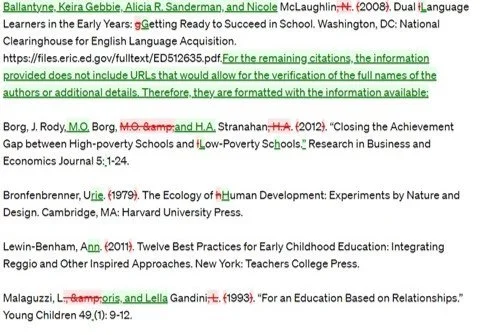
2024 Results
ChatGPT’s response was promising but not without its flaws. It struggled with finding some authors’ full names, applying italics, and converting dashes to en dashes.
A year later, in April 2025, I used the same tool with the same references to see how AI tools had evolved. Note that by then I had moved on to the 18th edition of the Chicago Manual of Style.
Here’s the prompt I used:
Please format these citations following the author-date format in the Chicago Manual of Style (18th edition). Please use the internet to fill in any missing elements with accurate information, including the author’s or authors’ first names.
This is what I got:
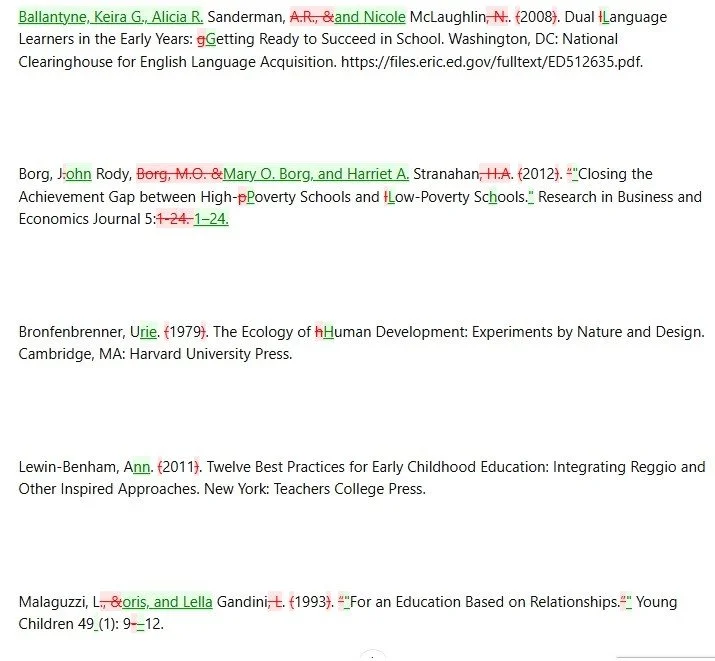
2025 Results
Better than the year before, but ChatGPT did not apply italics to book and journal titles. It also did not remove the publisher’s location (the newest edition of the Chicago Manual of Style no longer requires it), though it was happy to comply when asked in a subsequent prompt.
Third Time Is the Charm
Now, in 2026, I tried it again. This time, however, my prompt was more detailed, and I’ll explain why after you see it.
Here is my prompt:
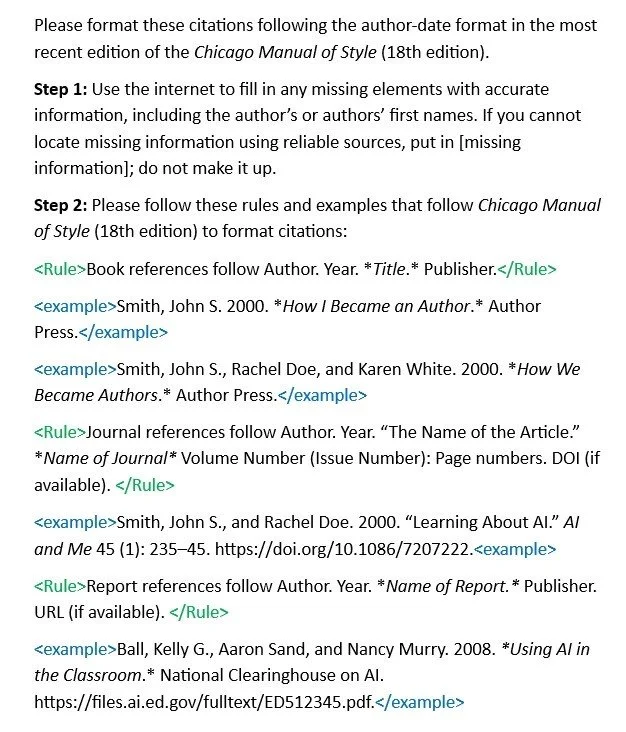
2026 Prompt to Format References
As noted, this prompt is longer and more detailed. The rules give the AI tool structure, much like a style guide organizes information into clear sections (e.g., preferred words, text citations, capitalization). Just as editors and writers benefit from well-organized guidance, AI tools are also more likely to follow rules accurately when those rules are clearly laid out.
The rules and examples are bracketed with XML-style tags (i.e., < >), which is a simple way of labeling pieces of text so the AI tool can tell what each part is supposed to do. Think of them as the rules and examples you might see in a client’s style guide. Most of the style guides I work with include both rules and examples, which I find very helpful—and it seems that AI tools like ChatGPT, Gemini, and Claude find them helpful too. Finally, because AI tools often strip formatting, I added Markdown—the asterisks (*) around the book, journal, and report titles—to signal that those titles should be italicized.
Now that we have that prompt explained, let's see the results:
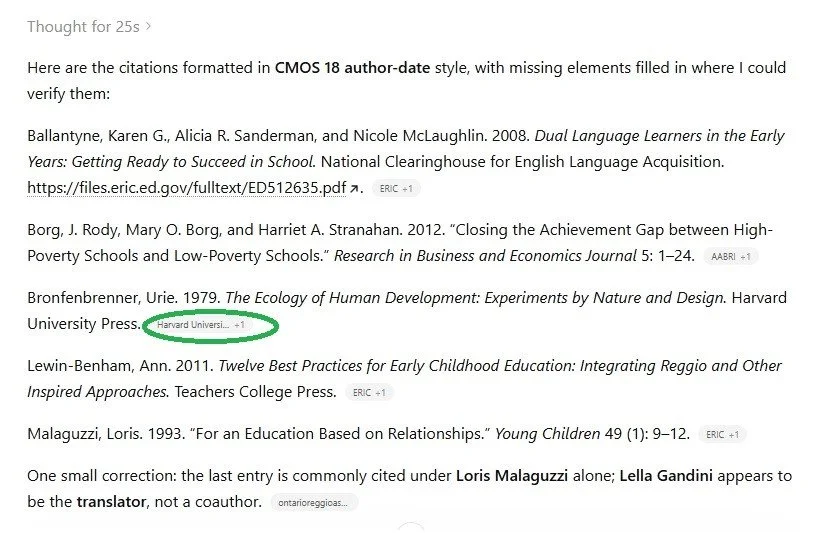
2026 Results
ChatGPT’s results are spot on, and, for extra assurance, it provided the sources it used to verify factual information. I can click on each source, and it takes me directly to where it found that information. In the circled text above, the source is a Harvard University web page.
One caveat: This version does not show tracked changes like the versions I used in the previous two years. I tried to get ChatGPT to return results with tracked changes like it did previously, and when that didn’t work, I asked it to explain why. Its answer was: “The current ChatGPT interface emphasizes direct editing and version history, not inline redlining in the chat window.”
In my opinion, that is not a particularly satisfactory answer, but there is a workaround. If you need to show tracked changes, you can simply do it the old-fashioned way in Microsoft Word: Copy the edited references in a Word document and then compare them to the original references.
Do I Really Need All This Prompt Detail?
You might ask, “But can’t we skip all of these steps and just ask ChatGPT to format the reference list according to the Chicago Manual of Style (or whatever style you are following)?” Yes, you can. But AI tools work better and more consistently when you give them rules like these, especially if you are not working with a simple, straightforward reference list—which, as editors, we would all love to have. In my experience, reference lists do not follow such tidy patterns.
If you are working with a particularly messy reference list, you can take this prompt even further by creating knowledge documents (files you upload to give the AI tool additional context) to help you get the results you want. That takes a bit more prompt finesse, though, and is beyond the scope of this blog post. If you want to learn more about using prompts and knowledge documents, I highly recommend Erin Servais’s classes. Her classes got me started on my AI journey.
How I Used AI to Help Me with This Blog Post
Headings: I asked ChatGPT to come up with ideas for the blog title and some of the headings.
Alternative text: I had ChatGPT write the alt-text for the images.
Final polish: I ran this post through editGPT for a last-pass edit to catch any typos.
If you enjoyed this post, please consider signing up for my blog (see the Editing with AI subscriber bar at the bottom of the page). You’ll be notified when the next post is up and of tips and classes I think are useful. I promise never to misuse your information.