How I Used AI This Month (and One Way I Didn't)
AI is a helpful partner in my editing workflow.
Here are four real examples from my work, including prompts that you can adapt for your own projects. Each example follows the same pattern: The issue → Action and prompt → AI response → Verification.
Fact-Checking Organization Names and URLs
The Issue
I was editing a revised edition of a nonfiction book, and each chapter concluded with a list of education-related organizations and links. My contract called for checking new information only, but I suspected that many organization names and URLs from the first edition were outdated.
Action and Prompt
I pasted the list into ChatGPT and asked it to verify the organization names and URLs, returning only what looked incorrect or suspicious. (Note that I used the paid version of ChatGPT 5.2 and its Thinking model.) Here's the prompt I used:
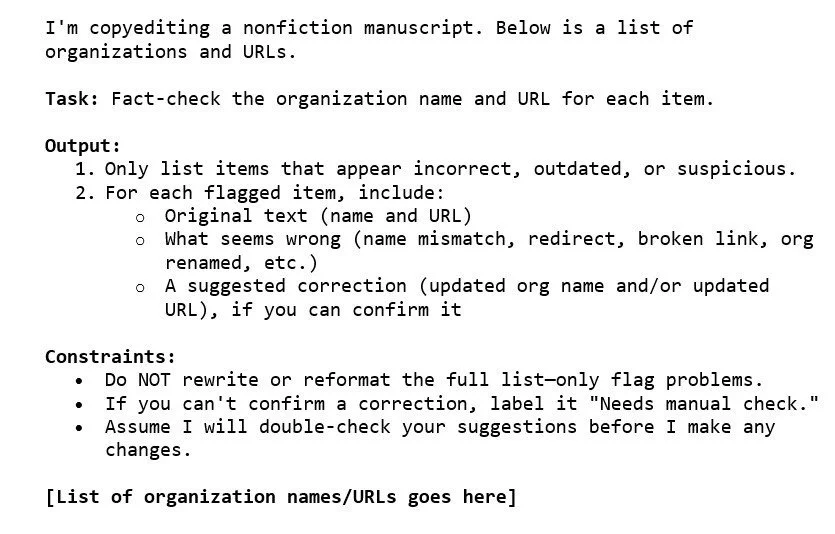
Prompt for Fact-Checking
AI Response
ChatGPT returned a short list of "problem entries," saving me from manually checking everything.
Verification
I double-checked every problem entry by opening the link and confirming the organization name on the official site. ChatGPT caught several issues that I would not have caught otherwise.
This task was an add-on beyond the agreed scope of this project, but it took only about 10 extra minutes per chapter and delivered a high payoff, benefitting the client.
Mining My Own Writing for TextExpander Snippets
The Issue
I write short summaries as part of a structured review for a client who wants me to use consistent phrases and sentences in these summaries.
I'd just learned about TextExpander and wanted a quick way to identify my most repeated sentences and phrases so I could turn them into snippets. (If you haven't tried TextExpander, it's worth a look; it's one of the fastest ways to speed up repetitive writing, right up there with macros.)
Action and Prompt
I uploaded an Excel sheet containing my summaries and asked ChatGPT to scan the text and extract repeated phrases.
Here's the prompt structure I used:
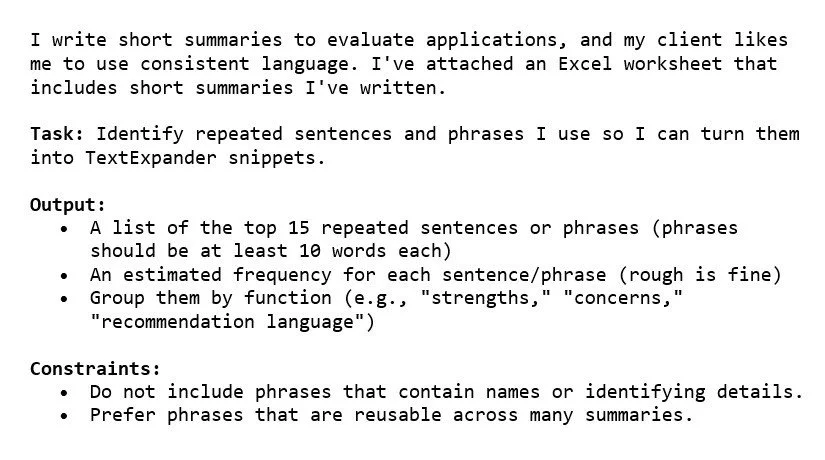
Prompt for Mining My Own Writing
AI Response
ChatGPT created a list of my "greatest hits"—the repeated language I didn't realize I used so often. I turned those into TextExpander snippets the same day.
Verification
I skimmed the output for phrases that were too context specific (not worth snippetting), phrases that needed a tone tweak, and anything that might accidentally pull in identifying details.
Using editGPT to Get Rid of Filler Language
The Issue
While copyediting a nonfiction book written by an academic writer, I found a lot of classic filler structures (e.g., there is/there are, it is important, it is recommended) and other phrasing that slows down the reading. Sometimes I know a sentence is mushy, but I want options—fast.
Action and Prompt
I pasted a problematic paragraph into editGPT and tested a few of its buttons ("Streamline," "Concise,” and “Active”) to generate revision ideas.
AI Results
editGPT gave me immediate suggestions on how to get rid of filler language. The value wasn't in accepting every suggestion but in getting multiple rewrites that helped me see what the sentence was trying to do and then choosing (or writing) the cleanest version.
My Verification
I checked each rewrite for:
accuracy (no meaning drift)
voice (still sounds like the author, not like AI)
unintended emphasis (AI tools do not understand nuance and sometimes "reshuffle" what’s important)
In practice, editGPT can become an idea generator for revision.
Not Relying on AI for Whole-List Reference Reformatting
The Issue
Going back to the revised edition of the nonfiction book I referenced earlier, the book had long chapter reference lists. The carryover references from the first edition followed The Chicago Manual of Style (17th ed.), and I needed to update them to the 18th edition. Also, the new references were inconsistent—some followed Chicago style and some didn't. Finally, all of the reference lists included books with subsequent editions written out as "Second Edition," "Third Edition," and so on. The Chicago Manual of Style (18th ed.) requires "2nd ed.," "3rd ed.," etc.
This is where people often assume AI can "just fix the references." But in real life, reference lists are full of variables: books, reports, blogs, web pages, organizations as authors, missing dates, unstable URLs...the list goes on.
I did not use ChatGPT to fully reformat the references because these lists contained too many variables.
Instead, I used AI for a narrower task: I asked ChatGPT to write a Word macro that converted spelled-out edition phrases into the abbreviated form.
Action and Prompt
I asked ChatGPT to create a macro that finds and replaces "Second Edition" with "2nd ed.,” "Third Edition" with "3rd ed.,” and "Fourth Edition" with "4th ed."
Here is the prompt:
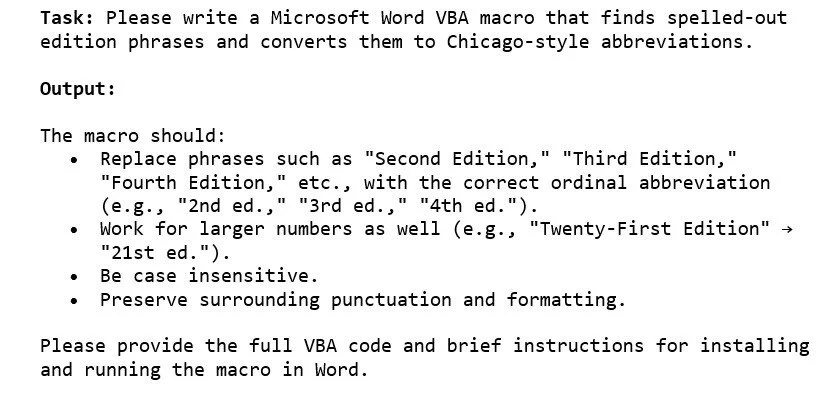
Prompt for Writing a Very Specific Macro
AI Results
I got a macro code quickly, installed it, tested it on a copy of the document, and it worked! If your macro doesn’t work the first time you use it, go back to your AI tool of choice, tell it how the macro didn’t work, and ask it to correct the code.
Verification
Macros are powerful. If you’re nervous about running a macro, keep it simple: Run it on a copy, test on a small section first, and then read the tracked changes carefully before accepting anything.
When I was editing the reference list, I carefully read through the tracked changes the macro made. This was much faster than actually making those changes myself. Plus, macros are more accurate than me—if I had made those changes myself (deleting "Second Edition" and then typing in "2nd ed." over and over again), I would have certainly made errors.
The Takeaway
If you're curious about AI but not sure where it fits, aim for small and specific tasks:
Verify facts and links, and double-check the results.
Mine your own writing for reusable language and faster workflows.
Generate revision options to break through filler language.
Use AI for well-defined tasks (macros, find/replace logic), not messy, high-variance formatting.
How I Used AI to Write This Post
Here’s how I used AI to help me write and edit this blog post:
First draft: I keep a running list of how I use AI in my day-to-day work, but these are just sloppy notes to myself. I have a two-page style guideline for my writing, so I asked ChatGPT to use that and my previous blog posts to write a first draft, which I then read, edited, and edited again.
Strengths and weaknesses: After I thought my blog post was in decent shape, I asked ChatGPT to give me feedback. What were this post’s strengths and weaknesses? Where was it confusing?
Alternative text: I had ChatGPT write the alt-text for the images in this blog post.
Final polish: I ran this post through editGPT for a last-pass edit to catch any typos.
If you enjoyed this post, please consider signing up for my blog (see the Editing with AI subscriber bar at the bottom of the page). You’ll be notified when the next post is up and of tips and classes I think are useful. I promise never to misuse your information.