New Year, Small Steps with AI
Is one of your New Year’s resolutions to figure out if AI is for you, or if AI can even help you? With so much content out there, it can feel overwhelming. Where do you even begin? Here’s a step-by-step guide to getting comfortable with AI.
Step 1: Pick One AI Tool and Pay for a One-Month Subscription.
Just pick one—ChatGPT, Claude, or Gemini—and don’t overthink it.
I’ve used all of these tools. Some are better at certain tasks than others, but they’re all large language model (LLM) tools built on similar ideas. It’s not worth obsessing over which one to use; it’s more important that you use one. You can always experiment later, once you feel comfortable.
If you haven’t already, upgrade to the paid version (or start a trial) for about $20 a month. If you’re constantly fighting usage limits or missing key features, it’s hard to get a realistic sense of how the tool fits into your work. If you’re fortunate to have a company Google Workspace account, you may already have access to Gemini (Google’s AI tool), so you might not have to pay for anything.
Step 2: Set Up Your Privacy Controls.
Everyone is worried about companies using their data to train the LLMs. The good news is that these tools give you options to opt out.
Once you’ve set up your account (the paid one, remember, because you want to get the most bang for your buck), go into your tool’s settings and opt out of having your data used for training. Each tool hides this in a slightly different spot. For ChatGPT, it’s under Data Controls. For Claude, it’s under Privacy Settings. If you can’t find the privacy controls, ask your AI tool of choice to help you find them.
Step 3: Set a Clear Goal.
Before you paste a single sentence into the tool, decide what you’ll use AI for (for now).
Keep it small and specific. For example, you might use AI for brainstorming email subject lines, clarifying grammar or style rules, drafting outlines for blog posts, or turning messy notes into a clearer list. Also, decide what you’ll avoid, such as rewriting whole chapters for clients or working with anything highly sensitive or confidential.
Then choose one clear goal for the next 30 days, such as:
Save 10 minutes per project on emails.
Write better headings.
Succinctly explain grammar rules to authors.
Write your goal in a way you can actually notice later: “By the end of the month, I’ll know whether AI helps me with ______.”
Step 4: Practice on Safe Text.
Now that you have selected your goal, spend some time playing with the tool on low-stakes material (your own writing, public domain text, or text that you’ve asked AI to write). The goal here is to get comfortable asking the tool for help without worrying about privacy or ethics.
Depending on your goal, here are a few prompts to try:
“Explain the difference between restrictive and nonrestrictive clauses in plain language, as if I’m a busy author.”
“Here’s a paragraph from my editorial letter. Remove filler language such as there is, in order to, or the fact that.”
“Suggest five alternative headings for this blog post. The audience is freelance editors.”
If you don’t like your results, tell AI and ask it to help you write a better prompt. For example, when I used the prompt for removing filler language from my editorial letter, I didn’t like my results. I felt ChatGPT changed too much, so I asked how I could improve my prompt.
Here is my conversation with ChatGPT and ChatGPT’s reply:
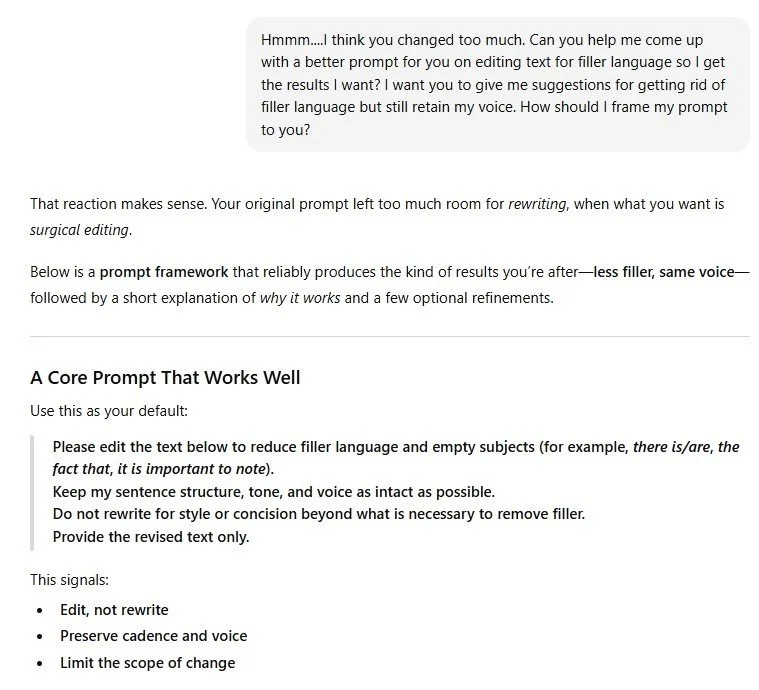
How ChatGPT Helped Me Write a Better Prompt
Step 5: Try AI on a Tiny Slice of Real Work.
First things first: You need to be transparent about your use of AI with your clients and your organization.
Find out what your clients’ or organization’s policies are regarding AI and follow them. If they don’t have policies (or are not sure what their policies are), be clear about how you plan to use AI and then follow their guidelines and rules.
Once you have permission, choose a small, low-risk piece of a real project (an author bio, a short summary, a messy paragraph). Treat AI’s output as suggestions only. Afterward, ask yourself:
Did this save time?
Did it keep the author’s voice?
Would I use AI for this task again?
Step 6: Decide on Your “AI Lite” Routine.
Based on what you’ve tried, decide on one or two tasks where AI really helped (and save that prompt somewhere—see, you’re already starting your prompt library!). Turn that into a simple routine, such as: “I’ll use AI at the start of each project to organize my editorial notes into an editorial letter and help me brainstorm headings and subheadings.”
Set a reminder to review this routine in a few months—you don’t have to decide everything now.
The Takeaway
Entering 2026, you don’t need a fully AI-powered editing business or a fully AI-free one. You just need enough hands-on experience to decide what makes sense for your workflow. You can move through these steps in a month, or take longer if that’s what you need. The goal is simple: Shift from “I keep meaning to try AI” to “I’ve tried it enough to know what works for me.”
And if you decide AI isn’t for you? Don’t forget to cancel your trial subscription 😊.
How I Used AI to Write This Post
Here’s how I used AI to help me write and edit this blog post:
Brainstorming: I asked ChatGPT to expand on my list of prompts for editors to try (under Step 4: Practice on Safe Text). I took two of ChatGPT’s suggestions and adapted them for this blog post.
Alternative text: I had ChatGPT write the alt-text for the image in this blog post.
Tone and formatting: I used my custom GPT in ChatGPT (yes, I created a custom GPT, and it wasn’t that hard!) to check for tone and style consistency throughout the post.
Final polish: I ran this post through Draftsmith for a last-pass edit. It flagged some wordy areas and caught a few typos I had missed.
If you enjoyed this post, please consider signing up for my blog (see the Editing with AI subscriber bar at the bottom of the page). You’ll be notified when the next post is up and of tips and classes I think are useful. I promise never to misuse your information.